

Once the quote is sent, it is not possible to do any changes to it - it has been recorded in the client's history. But it is possible to:
1) REPLICATE a quote = keep the same margins
When selecting this option, Quotiss will pick the latest updated contract rates from the system, re-applying the previously selected margins and adjusting the totals accordingly.
2) EXTEND a quote = keep the same totals
When selecting this option, Quotiss will pick the latest updated contract rates from the system, re-applying the previously calculated total and adjusting the margins accordingly.
3) NEGOTIATE a quote = keep same quote ID
This is a new option, designed for the cases when you wish to keep the same quote ID. Negotiated quotes will not be counted on the Dashboard as new quotes, will have 'Negotiated' status, and will be linked to the 'mother' quote.
To replicate, extend or negotiate a quote, please select a quote that has been sent and open it. All elements in the quote will be blocked for editing.
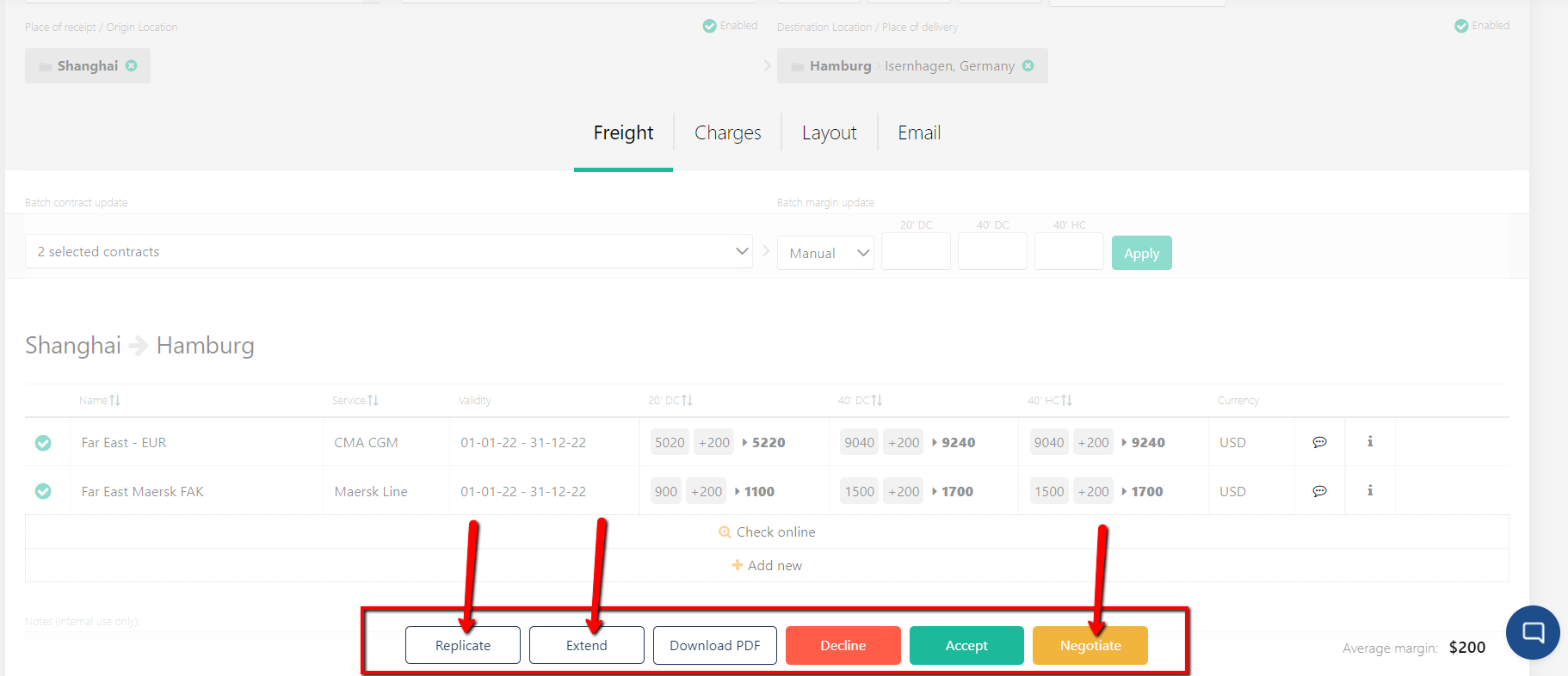
Click on the respective button, and the elements will unlock. The previous rate level will apply. You can change any of the parameters and follow the usual steps to send a new quote.